


How to Protect Company Data From Employee Theft, Insider Threats & Data Loss
- Tom Tardy
- 3 days ago
- 11 min read
Your firewall isn't the only thing standing between your company's data and someone who wants to steal it.
Sometimes the person accessing the data already has a username and password.
Sometimes they're an employee.
Sometimes they're a former employee whose access was never completely removed.
Sometimes they're a contractor who was given more access than they actually needed.
And sometimes they're a cybercriminal who stole an employee's credentials and now looks like a legitimate user.
That's why protecting company data requires businesses to think beyond traditional cybersecurity.
The question is no longer simply:
"How do we keep hackers out?"
Businesses also need to ask:
"What can someone do after they're already in?"
How Big Is the Employee and Insider Data Risk?
People remain one of the most significant components of cybersecurity risk.
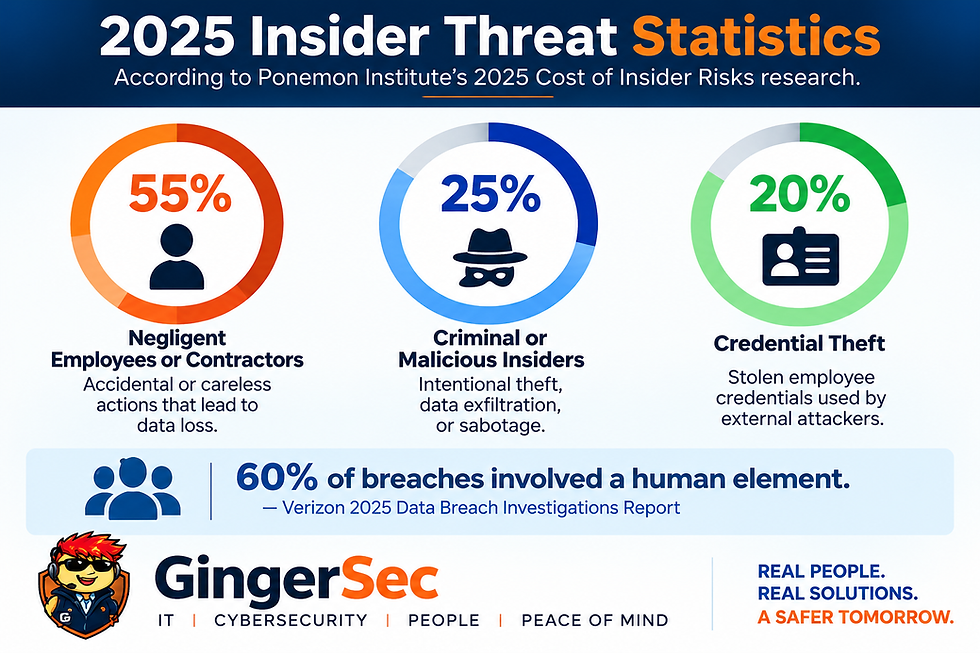
Verizon's 2025 Data Breach Investigations Report found that approximately 60% of breaches involved a human element.
That doesn't mean 60% of breaches were caused by malicious employees.
The "human element" includes activities such as social engineering, credential abuse, mistakes, and other situations in which people play a role.
When we specifically look at insider security incidents, the numbers provide an even better picture of the problem.
According to Ponemon Institute's 2025 Cost of Insider Risks research:
55% — Negligent employees or contractors
25% — Criminal or malicious insiders
20% — Credential theft
This distinction is extremely important.
The employee isn't always the attacker.
Sometimes they're the victim.
Sometimes they're careless.
Sometimes their credentials are stolen.
And sometimes they are intentionally taking company information.
A strong data-protection strategy needs to address all four situations.
55%: The Careless or Negligent Employee
According to Ponemon's research, 55% of insider incidents involved careless or negligent employees or contractors.
These people aren't necessarily trying to harm the company.
An employee might:
Send confidential information to the wrong recipient
Click a phishing link
Reuse a compromised password
Lose a company laptop
Store company information in personal cloud storage
Email company documents to a personal account
Accidentally create a public sharing link
Use an unauthorized USB drive
Download sensitive files to a personal computer
Upload confidential information into an unapproved AI service
The employee's intentions may be completely innocent.
The resulting data exposure may not be.
This is why cybersecurity can't depend entirely on employees remembering every security rule.
Good security combines employee training with technical controls that make dangerous actions more difficult.
25%: The Malicious Insider
Approximately 25% of insider incidents in Ponemon's research involved criminal or malicious insiders.
This is a very different situation.
The individual may intentionally use legitimate access to steal, destroy, copy, or disclose company information.
For example, an employee preparing to leave for a competitor could potentially download:
Customer lists
Pricing information
Proposals
Contracts
CRM records
Vendor information
Sales opportunities
Intellectual property
Company procedures
Financial information
Internal documentation
Or an employee could send those files to a personal email account or upload them to personal cloud storage.
The difficult part is that the employee may technically be authorized to access those files.
That's what makes insider threats so challenging.
The activity can initially look legitimate because the credentials are legitimate.
20%: Stolen Employee Credentials
Ponemon attributed approximately 20% of insider-related incidents to credential theft.
In this scenario, the employee isn't intentionally doing anything wrong.
Someone else has become the employee.
A cybercriminal may obtain an employee's credentials through:
Phishing
Fake Microsoft 365 login pages
Password-stealing malware
Password reuse
Social engineering
Session-token theft
MFA fatigue attacks
Once inside, the attacker may access email, SharePoint, OneDrive, Teams, financial systems, customer information, or other cloud applications.
Verizon's 2025 DBIR found that credential abuse represented approximately 22% of initial breach access vectors.
That's why passwords alone should no longer be treated as adequate protection for important business systems.
What Does an Insider Incident Cost?
Insider incidents can become extremely expensive.
Ponemon's 2025 research reported an average annualized cost of approximately $17.4 million among organizations studied for insider-risk incidents involving negligence, malicious insiders, and credential theft.
That number shouldn't be interpreted as saying the average small business will suffer a $17.4 million incident. It represents annual organizational costs among companies experiencing insider incidents.
But it demonstrates how quickly these events can become expensive.
Costs can include:
Incident response
Forensic investigation
Legal expenses
Business interruption
Lost productivity
Customer notification
Regulatory requirements
Cyber insurance claims
Reputation damage
Lost customers
Lost contracts
Data restoration
Security remediation
And before a company can respond to stolen information, it first has to know the information was taken.
How Do Employees Take Company Data?

A server is difficult to sneak out of an office.
A customer database isn't.
Thousands of files can potentially leave a company without anyone physically carrying anything out the door.
Here are some of the most common paths businesses should consider.
Personal Email
An employee sends company files to a personal Gmail, Outlook.com, Yahoo, or another private email account.
Once the information leaves the company's controlled environment, visibility and control can become much more difficult.
USB Drives
A small USB drive can potentially hold thousands or even millions of documents.
Organizations should decide whether employees actually require removable storage and whether its use should be restricted or monitored.
Personal Cloud Storage
Employees may upload company information to personal:
Google Drive
Dropbox
OneDrive
iCloud
File-sharing services
This is sometimes done for convenience rather than malicious purposes.
But convenience can still create a data-security problem.
Personal Computers and Mobile Devices
Allowing company information to be downloaded to unmanaged devices creates another challenge.
Ask a simple question:
If an employee downloads confidential files to their personal laptop today, can your company remove those files tomorrow?
If the answer is no, the business should reconsider how sensitive information can be accessed.
CRM Exports
Customer databases are particularly valuable.
An export could contain:
Customer names
Email addresses
Phone numbers
Pricing
Purchase history
Opportunities
Sales notes
Account information
Businesses should understand who has export privileges and whether large exports are logged or monitored.
Mass Downloads
Downloading three documents might be normal.
Downloading 30,000 files at 2:00 AM probably deserves attention.
Businesses should consider monitoring unusual file activity, particularly around sensitive repositories.
AI Has Created a New Data Leakage Problem
Artificial intelligence is quickly becoming another important component of corporate data protection.
Employees increasingly use AI to:
Write emails
Analyze spreadsheets
Summarize documents
Review contracts
Create proposals
Troubleshoot technology
Generate code
Analyze customer information
These tools can create enormous productivity gains.
They can also create new opportunities for accidental data exposure.
Imagine an employee asking an unapproved AI service:
"Analyze this customer spreadsheet and identify our 20 most profitable accounts."
The spreadsheet could contain:
Customer names
Contact information
Revenue
Pricing
Profit margins
Contracts
Account notes
The employee wasn't trying to steal anything.
But company information may have just been transferred into a service the organization hasn't evaluated or approved.
Businesses therefore need an AI Acceptable Use Policy explaining what employees can and cannot provide to AI services.
Employees shouldn't have to guess.
15 Ways Businesses Can Protect Company Data
1. Implement Least-Privilege Access
Employees should only have access to the information required to perform their jobs.
Don't give everyone access to everything simply because it's easier.
Convenience isn't a security strategy.
Access should be based on job responsibilities and periodically reviewed.
2. Require Multi-Factor Authentication
Multi-factor authentication should be standard for important business accounts.
That includes:
Microsoft 365
VPN
Remote access
Administrative accounts
Financial systems
Cloud applications
Password managers
Where practical, organizations should also evaluate stronger, phishing-resistant authentication methods.
3. Use Conditional Access
A correct password shouldn't necessarily equal unrestricted access.
Microsoft environments can use Conditional Access policies to evaluate factors such as:
User identity
Device
Application
Authentication strength
Risk
Other access conditions
This can help prevent compromised credentials from automatically becoming unrestricted access to company information.
4. Implement Data Loss Prevention
Data Loss Prevention — commonly called DLP — can help organizations identify and control sensitive information.
Depending on the organization's technology and licensing, policies can be created around information such as:
Social Security numbers
Financial information
Customer information
Healthcare information
Confidential documents
Intellectual property
DLP can help organizations control what happens when sensitive information is emailed, shared, copied, or otherwise moved.
5. Restrict External Sharing
Businesses using SharePoint, OneDrive, Teams, and similar platforms should regularly review external sharing.
Ask:
Can employees create anonymous links?
Can anyone share entire folders?
Do external links expire?
Can IT determine what information has been shared externally?
External sharing should be intentional rather than accidental.
6. Control USB and Removable Storage
Organizations should establish a clear removable-media policy.
Depending on business requirements, companies may:
Allow USB storage
Monitor USB activity
Restrict USB storage
Permit only approved encrypted devices
Block removable storage completely
The right policy depends on the business.
Having no policy at all shouldn't be the default.
7. Manage Company Devices
Business laptops and mobile devices should be centrally managed whenever possible.
Organizations should be able to enforce:
Encryption
Security updates
Endpoint protection
Screen locking
Device compliance
Security policies
A company-owned laptop shouldn't be treated like an unmanaged home computer.
8. Encrypt Company Laptops
A stolen laptop shouldn't automatically become a stolen database.
Full-disk encryption helps protect information stored on lost or stolen devices.
9. Monitor Unusual Data Activity
Security monitoring shouldn't only look for viruses.
Organizations should consider monitoring events such as:
Mass file downloads
Mass deletion
Large CRM exports
External sharing
Unusual administrative actions
Suspicious authentication
Permission changes
Unexpected data movement
Abnormal activity outside normal patterns
The goal isn't to spy on employees.
The goal is to identify security events that may indicate data loss, account compromise, or malicious activity.
Monitoring should always be implemented in accordance with applicable laws and company policies.
10. Separate Administrative Accounts
Highly privileged administrator accounts shouldn't be used for everyday email and web browsing.
Administrative access should be limited, protected, and monitored.
If an ordinary employee account is compromised, the attacker shouldn't automatically receive administrative access to the entire company.
11. Review Employee Permissions
Access tends to accumulate.
An employee receives access for a project.
Two years later, the project is over, but the permission remains.
Organizations should periodically review:
Microsoft 365 groups
SharePoint permissions
Administrator roles
VPN access
Shared mailboxes
Third-party applications
Cloud systems
Vendor accounts
If access is no longer required, remove it.
12. Establish an AI Acceptable Use Policy
Businesses should determine:
Which AI services are approved
What information employees may submit
What confidential information is prohibited
Whether customer information may be used
How intellectual property should be handled
When security or management approval is required
AI governance is quickly becoming part of normal business cybersecurity.
13. Protect Your Backups
What happens if a malicious employee — or an attacker using an employee's account — deletes company information?
Now ask another question:
Can that same account delete the backups?
If the answer is yes, you may not have the protection you think you have.
Backups should be appropriately separated, protected, retained, and tested.
14. Control Contractor and Vendor Access
Employees aren't the only insiders.
Organizations routinely provide access to:
Contractors
Consultants
Temporary employees
Accountants
Vendors
Software providers
IT companies
Third-party involvement in breaches is an increasingly important concern.
Every external account should have:
An owner.
A business purpose.
Appropriate permissions.
And, whenever possible, an expiration date.
15. Build a Real Employee Offboarding Process
One of the most important moments in company data protection happens when an employee leaves.
And it's one of the easiest processes to get wrong.
The First 15 Minutes of an Employee Termination Matter

IT shouldn't discover that someone was terminated when their manager submits a support ticket three days later.
HR, management, and IT should have a coordinated offboarding procedure.
For a planned or sensitive termination, that process might look like:
Management / HR Notification
↓
IT Prepares Account Offboarding
↓
Account Disabled at the Authorized Time
↓
Active Sessions Revoked
↓
VPN and Remote Access Removed
↓
Third-Party Accounts Disabled
↓
Company Equipment Recovered
↓
Shared Credentials Changed
↓
Company Information Preserved
↓
Recent Security Activity Reviewed When Appropriate
↓
Mailbox and File Ownership Transferred
The exact procedure depends on the organization and circumstances.
The important point is that there is a procedure.
Changing an Employee's Password May Not Be Enough
A common offboarding mistake is simply changing the user's Microsoft 365 password.
That may not terminate every existing authenticated session immediately.
A comprehensive offboarding procedure should consider:
Disabling the account
Revoking authenticated sessions
Removing MFA methods when appropriate
Removing VPN access
Removing remote-access tools
Disabling third-party applications
Recovering devices
Removing physical access
Changing shared credentials
Reviewing privileged access
The objective is straightforward:
When employment ends, access ends.
Pay Attention Before an Employee Leaves
There's another period companies often overlook:
The weeks before departure.
A departing employee may still have completely legitimate credentials and access.
Depending on company policies, legal requirements, and circumstances, security teams may need to investigate unusual behavior such as:
Sudden mass downloads
Large CRM exports
Creation of external sharing links
Unusual printing
Copying files to removable media
Accessing information unrelated to normal job responsibilities
Large downloads outside normal working hours
Forwarding sensitive information to personal accounts
None of these behaviors automatically proves malicious intent.
Context matters.
But your organization needs adequate logging to answer the question if something happens.
What Company Data Should You Protect?
Data protection isn't limited to Social Security numbers and credit cards.
Some of your company's most valuable information may not look particularly sensitive at first glance.
Customer Data
Customer names, addresses, contacts, purchase history, contracts, communications, and account information.
Financial Information
Banking information, payroll, invoices, tax information, payment records, budgets, and financial reports.
Employee Information
Payroll, HR records, tax documents, benefits information, and personnel information.
Intellectual Property
Software, designs, documentation, business processes, research, formulas, procedures, and proprietary methods.
Sales Information
Customer lists, prospects, leads, pricing, margins, proposals, sales history, and opportunities.
Credentials
Passwords, API keys, service accounts, administrative credentials, and authentication information.
Operational Information
Network documentation, vendor information, internal procedures, configurations, internal communications, and security documentation.
Sometimes the most valuable spreadsheet your business owns isn't labeled CONFIDENTIAL.
Microsoft 365 Can Protect More Than Email
Many businesses already pay for security capabilities through Microsoft 365 but aren't using them effectively.
Depending on licensing and configuration, Microsoft's ecosystem can provide capabilities involving:
Microsoft Entra ID
Multi-Factor Authentication
Conditional Access
Microsoft Intune
Microsoft Defender
Microsoft Purview
Data Loss Prevention
Information Protection
Audit logging
Retention
Device compliance
Endpoint security
But there's an important distinction:
Buying Microsoft 365 doesn't automatically secure Microsoft 365.
Licensing provides capabilities.
Configuration provides protection.
Ask These 7 Questions About Your Company Data
Business owners don't need to understand every cybersecurity acronym to identify potential problems.
Start with seven questions.
1. WHO has access?
Employees?
Contractors?
Vendors?
Former employees?
2. WHAT can they access?
Everything?
Their department?
Only what their job requires?
3. WHERE can they access it?
Company computers?
Personal laptops?
Phones?
Anywhere in the world?
4. WHAT can they do with it?
Read it?
Download it?
Print it?
Share it?
Delete it?
5. CAN you detect unusual behavior?
Would anyone know if an employee downloaded 20,000 company files tonight?
6. CAN you remove access immediately?
If an employee leaves at 2:00 PM, how long does it take to remove their access from every business system?
7. CAN you recover?
If an employee or attacker deletes critical company information, can you restore it?
If you don't know the answers, your business may have security gaps worth investigating.
Your Employees Aren't the Enemy
Employee data protection shouldn't be based on the assumption that every employee is trying to steal information.
The statistics demonstrate why.
Negligent insider incidents are more common than intentionally malicious insider incidents.
The objective is to build an environment where:
Good behavior is easy.
Dangerous behavior is difficult.
Malicious behavior can be detected.
Compromised accounts have limited reach.
Former employees lose access immediately.
That requires:
People + Policy + Technology + Monitoring + Process
There isn't one security product you can purchase that solves all five.
How GingerSec Helps Protect Company Data
GingerSec, LLC helps businesses implement practical cybersecurity and IT controls designed to protect information from both internal and external threats.
GingerSec services include:
Managed IT Services
Managed Security Services
Microsoft 365 security
Identity and Access Management
Multi-Factor Authentication
Conditional Access
Endpoint security
Device management
Employee onboarding and offboarding
Data protection
Backup and disaster recovery
Security monitoring
Cybersecurity assessments
Cyber insurance readiness
We help businesses answer questions such as:
Who currently has access to our company data?
Can employees download confidential information to unmanaged devices?
Can company files be sent to personal email accounts?
Are former employees completely disabled?
Are Microsoft 365 security capabilities properly configured?
Would anyone know if thousands of company files were downloaded tonight?
If you don't know the answers, it's better to find out during a security review than after a data breach.
Protect the Identity. Protect the Device. Protect the Data.
Modern cybersecurity isn't simply about keeping hackers outside your network.
Businesses need to protect company information wherever it goes.
That means controlling identities, securing devices, limiting access, monitoring unusual activity, protecting backups, training employees, securing Microsoft 365, and having a reliable process when employees leave.
Whether the threat comes from a cybercriminal, compromised account, accidental mistake, malicious insider, contractor, or former employee:
Your company's data is one of your most valuable assets. Protect it accordingly.
Is Your Company Data Properly Protected?
GingerSec, LLC can help evaluate your organization's Microsoft 365 environment, employee access, endpoint security, data-protection controls, backup strategy, and onboarding/offboarding processes.
Contact GingerSec today to schedule a Company Data Protection & Access Security Review.
GingerSec, LLC Managed IT • Cybersecurity • Microsoft 365 • Identity Security • Data Protection
Serving businesses in West Virginia, Arizona, and beyond.
Sources
Statistics referenced in this article include research from the Verizon Data Breach Investigations Report and Ponemon Institute's Cost of Insider Risks research. Statistics should be interpreted within the methodology and populations studied by their respective researchers.


Comments